Flagship program
0100

Builder Weekend

From zero to a working AI build, in one weekend.

In two days, one person can operate like a small company.

NT$32,000 · Sat 5 Sep + Sun 6 Sep · 12 seats

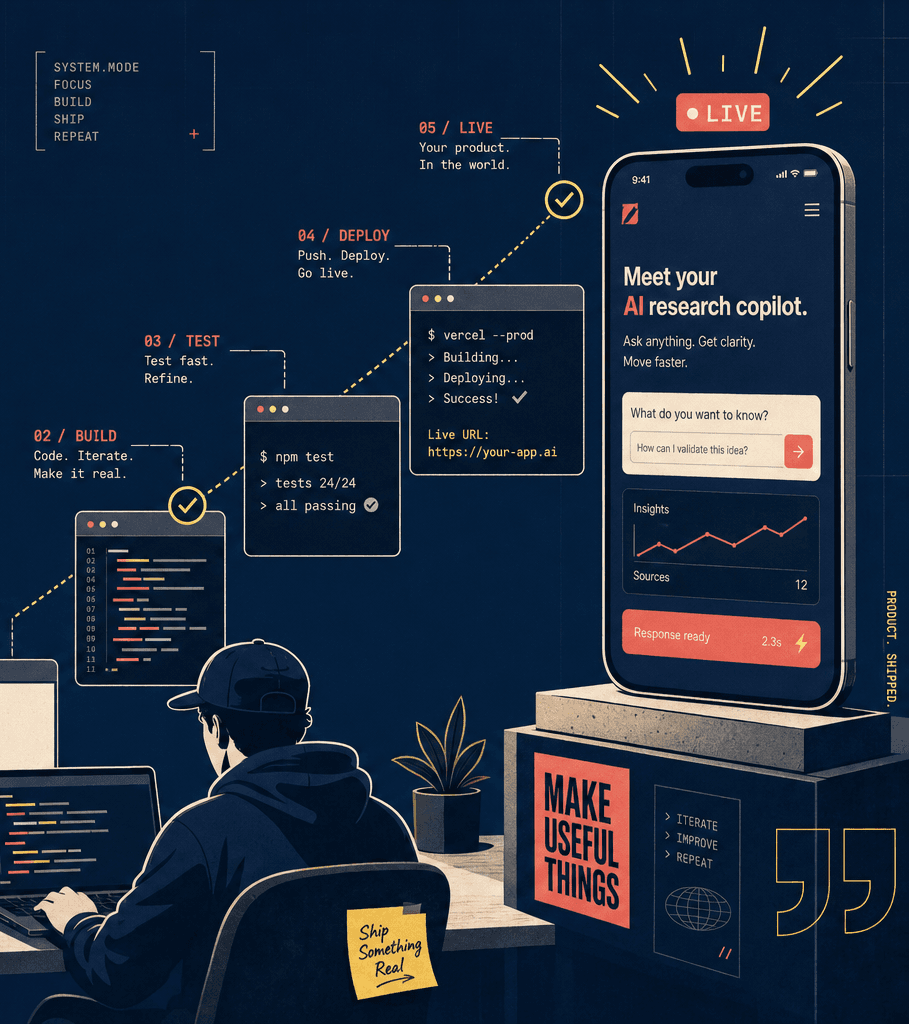
From an empty terminal all the way to a live product open on a phone
Length
One weekend · Sat + Sun, 8 hrs each
Class size
8–12 builders (high-touch)
Location
Taipei · Zhongshan District
Coding background
Not required
Why this class exists
Most people who say "I want to get into AI" don't want to study AI — they want to be where we are today, without the half-year of pain. This is the fast lane: you don't need to know how every gear turns, you need to know what it does and how to drive it.
Pacing pedagogy: "Use it, don't build it from scratch."

You don't build the skills — we install the RF kit on your machine and teach you to drive the Harness. You leave with a permanent, transferable mental model, not memorised syntax. Brief summaries over deep theory; momentum over mastery.

What actually changes hands

The product you ship this weekend is the proof. The kit you leave with is the value.

What you take home

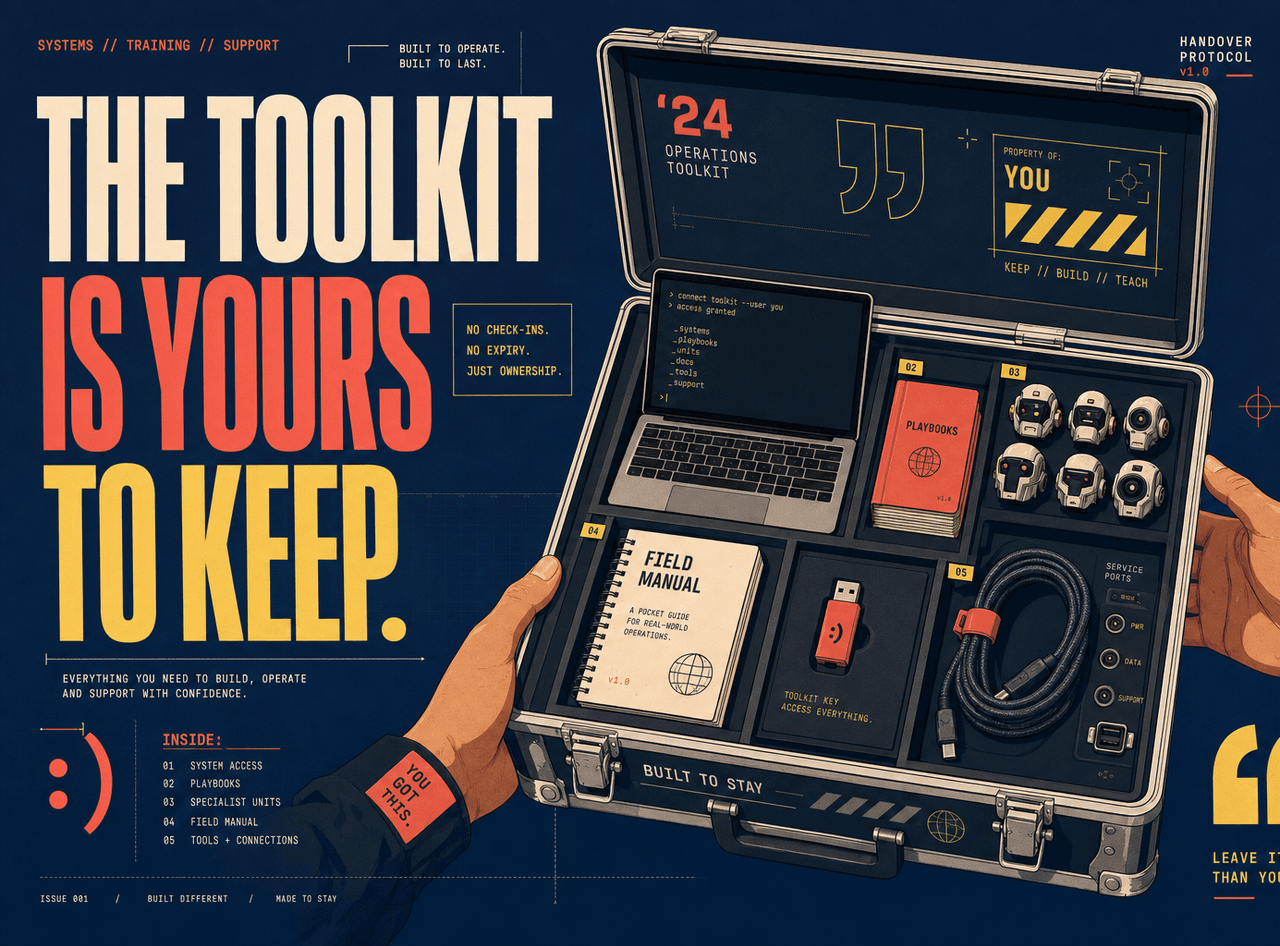
When the weekend ends, these five things are yours.

  1. A real, working product you built — live on the public internet
  2. The RF Builder Skills Pack permanently installed (13 skills + 12 specialist agents + knowledge pack)
  3. A printed RF-branded cheatsheet booklet
  4. Your first session handoff (FLIGHT-LOG.md) — proof you can resume any build
  5. One month free community access + a booked 1-hour 1:1 with Jon
An open tool case holding a laptop, playbooks, specialist agents, a printed field manual and connectors — permanently yours after class
The core mental model

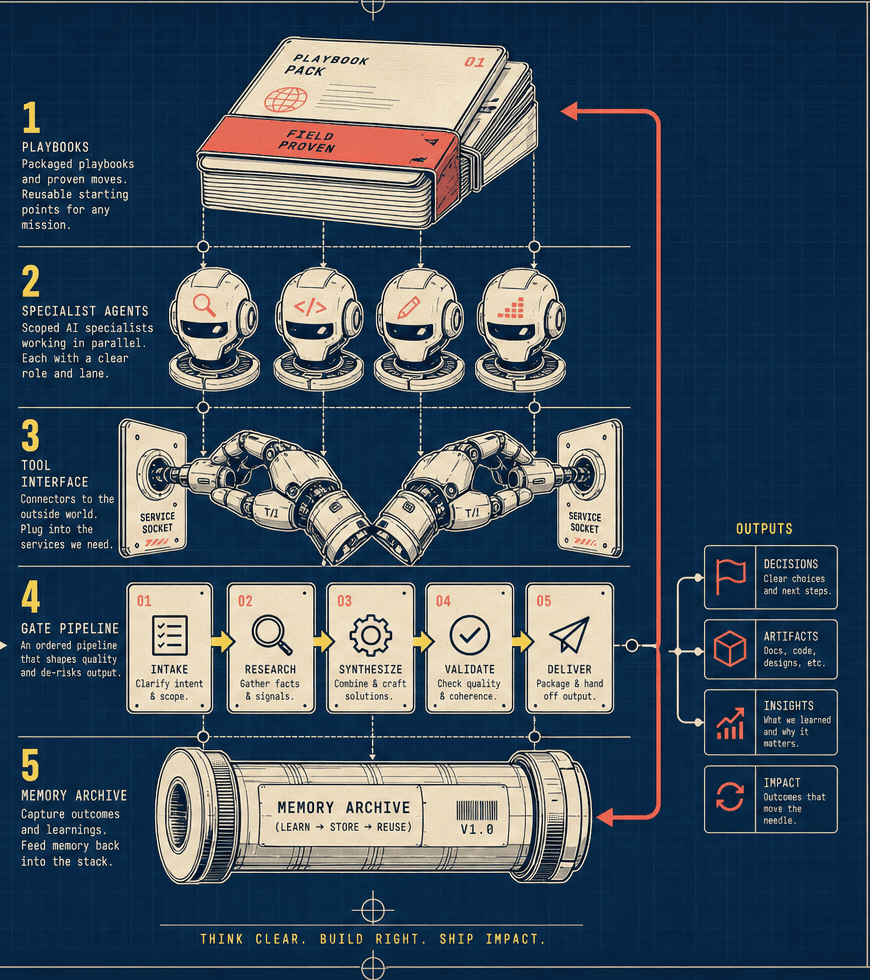
The Harness — five layers

This is what the weekend actually teaches. The product is just proof you learned it.

SKILLSPackaged playbooks

You don't re-explain how to plan a product every time — you type /blueprint and the AI already knows the whole play.

/blueprint · /operation · /verify

SUBAGENTSScoped specialists

One handles security, one checks the plan, one debugs. Each has one job, and they run in parallel.

dev-sherpa · rf-wave-checker · stuck-debug-coach

MCPThe AI's hands

How the AI actually opens a GitHub repo, creates a Supabase database, writes to Notion — all of it runs over MCP.

GitHub · Supabase · Vercel · Slack · Notion

PIPELINEThe order of operations

Think it through → find the holes → approve → build autonomously → confirm it works. This order is how a one-person company operates.

Blueprint → Bulletproof → Greenlight → Operation → Verify

MEMORYHandoffs and captured learning

Stop mid-build today, pick up in five seconds tomorrow. This is how companies work: nobody starts from zero every day.

/takeoff · /landing · /capture

Schematic of the five layers: playbooks, specialists, tool interface, gated pipeline, memory
Why this matters

Why does this matter? Because models change. The strongest AI in 18 months might not be Claude — and that's fine. These five layers hold on any agentic AI. You're not learning Claude; you're learning to harness whatever comes next.

The order of operations

The production line of a one-person company.

Five stages, five commands. On day two you run the whole line yourself.

  1. 01Blueprint/blueprint

    Turns the fuzzy idea in your head into a spec you can build

  2. 02Bulletproof/bulletproof

    Hunts the holes in that spec like a senior engineer would

  3. 03Greenlight/greenlight

    Works backward from the goal — will this plan actually get there? — then approves

  4. 04Operation/operation

    Builds autonomously in waves. Your job is deciding at the gates

  5. 05Verify/verify

    "Build complete" is not "it works." Actually run it, actually confirm

The curriculum

Two days, five modules.

M1Session 1 · Foundation

Setup + The Harness

The most important block of the weekend. We lay out the five-layer mental model, then install the entire RF kit on your machine with one command — permanently, it doesn't disappear when class ends.

  • Start by understanding what you set up before class — the four accounts and six tools, one line each, including exactly what the Claude Max subscription buys you
  • Install Claude Code live, confirm claude --version returns a version
  • Install the RF Builder Skills Pack in one command (13 skills + 12 agents + knowledge pack)
  • Wire three MCP servers — Vercel, Chrome DevTools, Supabase. These are the AI's hands: one command, permanent on your machine
  • Run verify until every check is green, then scaffold your own project
  • 30-minute Harness lecture + live counselors demo: one prompt routed to several different AIs
bootcamp-scaffoldcounselorsmcp-guide
DeliverableA working environment + a scaffolded project

M2Session 1 · Foundation

The Stack Tour

90 seconds per tool: what it's for, the one Claude command that drives it, and the CLI line you'll see fly by. The goal isn't mastery — it's orientation plus one real round-trip. "You don't need to understand the engine; you need to know where it takes you and how to drive."

  • Push your scaffolded project to a fresh GitHub repo
  • Deploy a hello-world to Vercel and get a real URL
  • Have Claude open the URL you just deployed, read the console, and report back — no copy-pasting error messages
  • Open that URL on your own phone (remember this feeling)
/github-cli/supabase-cli/vercel-auditchrome-devtools
DeliverableA live hello-world URL
M3Session 1 · Blueprint → Bulletproof

Blueprint Your Real Project

The heart of Session 1. This is where the weekend stops being a demo and becomes your thing. Operating like a company isn't about typing fast — it's about thinking it through before you build. A company has a PM, an architect, a QA team; today you bring all of those in as skills and agents.

  • Run /blueprint on your own idea and talk it through until the spec takes shape
  • dev-sherpa reviews it live, flagging HIGH / MED / LOW risks
  • Run /bulletproof to harden it — surfacing the edge cases, error handling, and security holes that would derail you
  • rf-amendment-applier folds the amendments back into your spec automatically — no manual editing
  • Before you leave, run /takeoff to write your first handoff file
/blueprint/bulletproofdev-sherparf-amendment-applier
DeliverableA hardened, build-ready PRD for a project you actually care about
M4Session 2 · Greenlight → Operation

Operation — Watch AI Build

This is where "operate like a company" becomes literal. The AI is your engineering team. Your job isn't typing — it's deciding at the gates: is this right? do we continue? that drifted, pull it back.

  • Run /greenlight — rf-plan-checker works backward from the goal to confirm the plan gets there
  • Type /operation, then watch it build autonomously, wave by wave
  • Between waves, rf-wave-checker calls GO / HOLD / HALT and rf-integration-checker confirms the pieces wire together
  • security-audit-specialist runs a security pass in the background
  • Approve at gates and intervene on deviations — deviation isn't failure, it's normal
/greenlight/operationrf-plan-checkerrf-wave-checkerrf-integration-checkersecurity-audit-specialist
DeliverableA built application
M5Session 2 · Verify

Verify, Debug, Ship

"Build complete" is not "it works." The AI will tell you it's done — your job is to confirm. Then we ship it. Things will break; that's normal. What matters is fixing them with method instead of guessing.

  • Run /verify — actually test against the success criteria in your own spec
  • /code-review for code quality, /security-review for hardcoded secrets and injection holes
  • When stuck, rf-debugger investigates by scientific method; when really stuck, stuck-debug-coach steps back and asks what you're missing
  • Point Claude at your live site through Chrome DevTools — it lists the console errors and finds the break itself. You stop being the AI's eyes
  • Learn the discipline: when stuck, add logging and see what's actually happening before you change anything — not "let me tweak one more thing"
  • Deploy. Every single person's URL has to open on their own phone
/verify/code-review/security-reviewchrome-devtoolsrf-debuggerstuck-debug-coachflight-deck
DeliverableA live URL you built yourself

The schedule

Session 1
10:00–10:30
Welcome + Richard video: "Why the Harness, why now"
10:30–11:00
M1 · Setup + The Harness→ Working env + scaffolded project
12:15–13:45
M2 · The Stack Tour→ A live hello-world URL
13:45–14:45
Lunch (on us)
14:45–18:00
M3 · Blueprint your real project→ A hardened, build-ready PRD
18:00–18:15
Session 1 wrap — confirm every PRD is greenlight-ready. Next session, we build.
~19:00
Optional group dinner — informal, everyone pays their own way
Session 2
10:00–10:30
Re-entry — type /landing and restore the entire previous session in seconds
10:30–14:00
M4 · Operation — watch AI build→ A built application
14:00–15:00
Lunch (on us)
15:00–17:00
M5 · Verify, debug, ship→ A live URL you built
17:00–18:00
Demo + Harness recap — everyone demos, run a final /takeoff, community handoff + book your 1:1→ First flight log + 1:1 booked
Permanently on your machine

The RF Builder Skills Pack — 13 skills, 12 agents.

You don't build these. One command installs them, and they don't disappear when class ends.

The Stack Tour

GitHubVersion control + collaboration

Every project's home. Versions, backups, and working with other people all live here.

/github-cligit init · git commit · gh repo create
SupabaseDatabase + auth + storage

Your app needs to remember things and let people log in — Supabase gives you both.

/supabase-clisupabase init · a migration · a table appearing
VercelHosting + deploy

How does what you wrote become a URL someone else can open? Vercel.

/vercel-auditvercel deploy · a live URL
Chrome DevToolsLet Claude see your own site

When something breaks you don't paste the error and hope — Claude opens a real browser, reads the console and network tab, screenshots the page, and tells you what's wrong. This is the MCP layer, working on the thing you built.

chrome-devtoolsconsole errors · network requests · screenshots
13 skills
  • /blueprintIdea → build-ready PRDPipeline
  • /bulletproofPRD hardening passPipeline
  • /greenlightApproval gate, routes to executionPipeline
  • /operationAutonomous multi-wave build runnerPipeline
  • /verifyManual verification of a changePipeline
  • /claude-md-auditProject context-file hygieneSetup
  • /mcp-guideGive Claude hands: list, add, and fix MCP serversSetup
  • /github-cliRepo, branch, and PR via ClaudeStack
  • /supabase-cliDB + auth + storageStack
  • /vercel-auditDeploy and audit a Vercel projectStack
  • /flight-deckSession takeoff / landing handoffsMemory
  • /captureSave learnings and decisionsMemory
  • /stuck-debug-coachUnstick a debug loop over 2 hoursDebug
12 specialist agents
  • dev-sherpaPRD + code review
  • security-audit-specialistSecurity / OWASP / secrets pass
  • stuck-debug-coachUnstick long debug loops
  • rf-plan-checkerGoal-backward plan verification (pre-execution)
  • rf-integration-checkerCross-wave wiring + E2E flow checks
  • rf-verifierGoal-backward against the PRD (post-build)
  • rf-codebase-mapperTech / arch / quality / concerns analysis
  • rf-debuggerPersistent-session bug investigation
  • rf-research-synthesizerFolds parallel research into Blueprint
  • rf-blueprint-researcherPre-blueprint domain research
  • rf-amendment-applierFolds Bulletproof amendments into the plan
  • rf-wave-checkerBetween-wave tripwire (GO / HOLD / HALT)
Who this is for

Are you one of these three?

Small business owners

AI doing real heavy lifting in the business, not party tricks

Hand the grind to a system you built yourself

Aspiring solo-founders

To build their own app or site fast enough to carry a side business

Build the thing, not just learn about the thing

Office workers buried in busywork

A system that genuinely takes work off their plate, not another subscription

In two days, one person can operate like a small company

What you need before you walk in

  • Your own laptop (Mac or Windows)

    The bar is low: 8GB of memory and about 10GB free is enough. macOS 12+, or Windows 10/11 with an SSD. Most laptops from 2018 onwards are fine — send us your model if you're unsure.

  • A GitHub account and a Vercel account

    Just create them beforehand — we send you a step-by-step guide

  • A real project you actually want to build

    No idea yet is fine — we have fallback projects you can adopt

  • A Claude Max subscription (US$100/mo, on you)

    Straight talk: the Pro plan gets rate-limited mid-build. Max is what holds up across a full build. Cancellable after class.

  • No coding background required

    You're learning to direct, not to hand-write every line

  • Setup done before you arrive (we walk you through it)

    We send a guide written for total beginners — what a terminal is, how to copy and paste. Stuck? Screenshot it and send it to Jon.

Price
NT$32,000/ person

About US$1,000 · 5–6 Sep · Zhongshan District, Taipei

This isn't the price of a class — it's a tool transfer. You're paying to have our entire build system installed on your machine, and to be taught how to drive it.

Apply for the next one
What's included
  • Lunch, snacks and coffee both sessions
  • A printed RF-branded cheatsheet booklet
  • RF Builder Skills Pack v1, permanently installed on your machine
  • One month free community + Discord access
  • A 1-hour post-class 1:1 with Jon
  • A swag pack

Not included: the Claude Max subscription (US$100/mo, paid directly to Anthropic — we take no cut).

Questions

You're probably wondering.

I can't code at all. Is this for me?

Yes — that's who it's designed for. You don't need to read every line of code; you're learning to direct. The room will have people who code and people who don't, and both ship by the end of the weekend. We send a setup guide written for total beginners and walk you through it before you arrive.

What if Claude isn't the best AI in 18 months?

Then you swap it out — which is exactly why we teach the Harness instead of "how to use Claude." The five layers (Skills, Subagents, MCP, Pipeline, Memory) hold on any agentic AI. In Session 1 we demo the same prompt routed to several different vendors' models so you see it with your own eyes. You're not buying a weekend; you're buying a way of working that doesn't expire.

I don't have a project idea yet.

That's fine. We keep a few ready-to-adopt projects on hand (a personal CRM, a content-repurposing tool, a booking page), and /blueprint exists precisely to turn a vague idea into a concrete spec. The more common problem is the opposite — scope that's too big. Jon cuts that down live to what actually ships in a weekend.

What language is the class run in?

Mandarin primary, with English for technical terms (blueprint, operation, deploy — these are loanwords here anyway). All materials are bilingual. If you or your team need an English-run session, tell us in the form.

Why Claude Max? Isn't Pro enough?

It isn't. A full autonomous build burns through a lot of usage, and Pro gets rate-limited partway — at the worst possible moment. Max (US$100/mo, the 5× tier) holds up. You pay it directly to Anthropic, we take no cut, and you can cancel after class. We'd rather be upfront than have you throttled mid-build.

How many people are in the room?

8–12. Deliberately small — through Session 1's afternoon and all of Session 2, Jon needs to be able to sit down next to every single person and look at their screen. Any bigger and that stops being possible.

What if I don't end up with something live?

The rule is that everyone leaves with a live URL, no exceptions. If time runs genuinely short, we ship the smallest working slice and the rest goes into your 1:1. If you leave without a live URL, Jon follows up personally within 48 hours until you're shipped.

How is this different from your other programs?

The Intro Workshop is "I want a taste." Build Day is "I have some skills and want to build." Builder Weekend is the fast lane: "I want to be where you are now." The Cohort is six weeks with a real client project and ongoing mentorship — depth rather than speed.

Frankie waving a small class in — eight to twelve builders around a long table, each laptop showing something they just shipped
Last step

Apply for the next Builder Weekend

The first cohort runs 5–6 September (one weekend, Sat + Sun), 12 seats only. Leave your details and we'll talk through what you want to build before confirming your place.

8–12 seats, first applied first spoken to
We talk through what you want to build before anything else
No payment now